Diagrams as code
Write Mermaid, D2 or nwdiag and get real shapes on the board that stay in sync with the code in both directions.
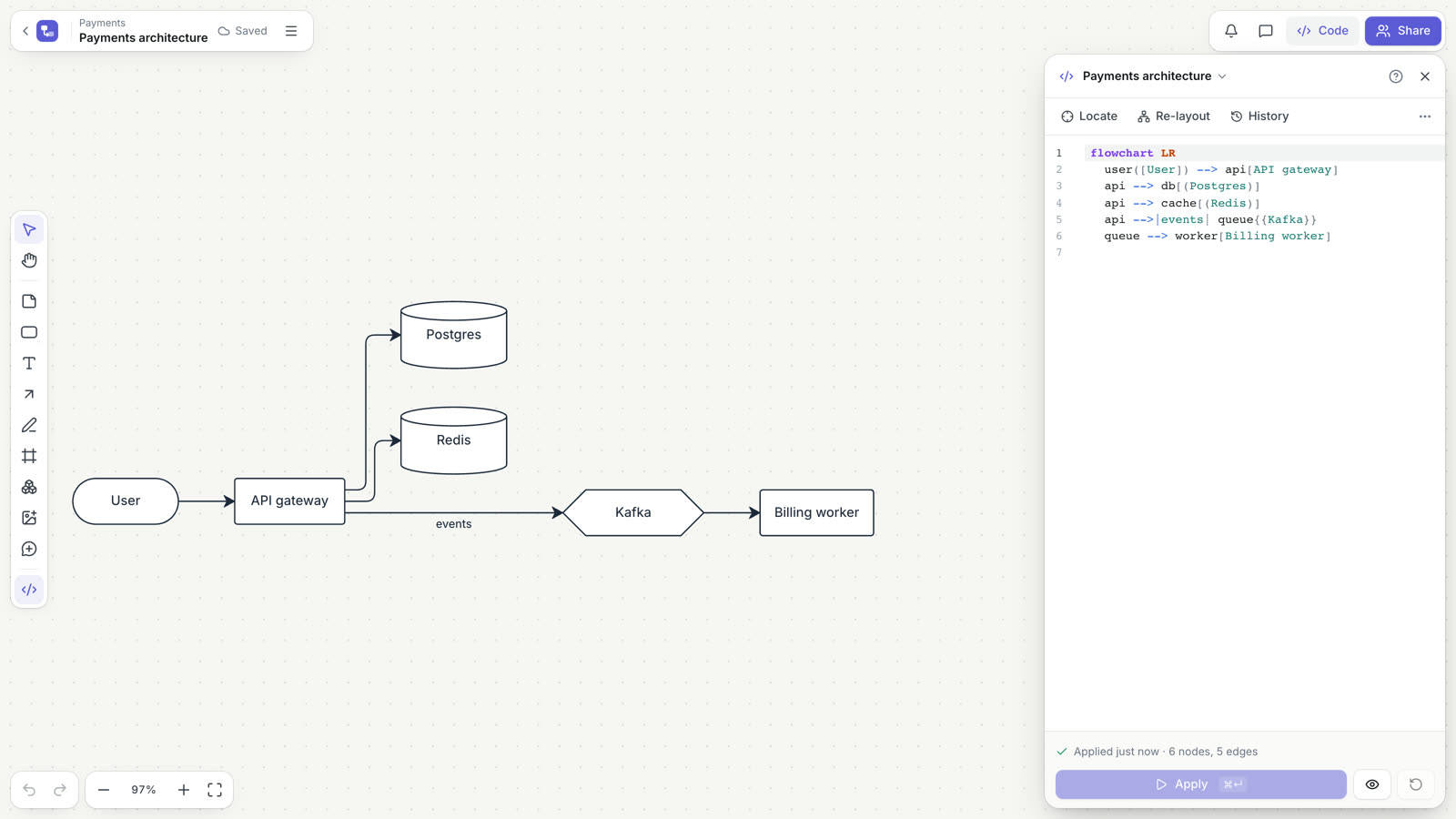
In Doska a diagram is code and shapes at the same time. You write Mermaid, D2 or nwdiag, press Apply, and the code becomes ordinary board objects: shapes, arrows and group frames you can move, recolor and comment on. Change the code later and the diagram updates in place, keeping your manual layout.
Choose a notation
| You want to show | Use |
|---|---|
| A process with branches and decisions | Mermaid flowchart |
| Steps in time, requests between services | Mermaid sequenceDiagram |
| Cloud architecture with AWS frames (region, VPC, subnets) | Mermaid architecture-beta |
| Architecture with nested containers | D2 |
| Networks, address ranges, hosts with IPs | nwdiag |
Doska detects the language from the code: Mermaid starts with a header (flowchart, sequenceDiagram, architecture-beta), nwdiag starts with nwdiag {, and anything else is read as D2. If a process has numbered steps, prefer sequenceDiagram: numbered arrows in a regular graph quickly become hard to read.
Create a diagram
- On a board, click Code in the top bar or press
⌘/Ctrl+Eto open the code panel. - Start from a template (Process, Architecture, AWS: VPC and subnets, Sequence, Network and others) or write your own code.
- Press Apply or
⌘/Ctrl+Enter. The shapes appear on the board.
You can also copy Mermaid code and press ⌘/Ctrl+V on the board, or select shapes, arrows and frames you drew by hand and click To diagram in the selection toolbar. A drawing becomes code with everything left where you drew it: architecture-beta if it has AWS frames or only icons, flowchart otherwise.
Mermaid
Doska supports flowchart (alias graph), sequenceDiagram and architecture-beta. Other Mermaid types (class, state, ER, gantt) are rejected with an error.
flowchart
flowchart LR
  user([Customer]) --> web[Web app]
  web -->|REST| api[Orders API]
  subgraph backend [Backend]
    api --> db[(Orders DB)]
    api -.-> queue[[Events queue]]
  end
  classDef hot fill:#fee2e2,stroke:#dc2626
class db hot- Directions:
TB,TD,BT,LR,RL. - Shapes:
[ ],( ),([ ]),[[ ]],[( )],(( )),{ },{{ }}, parallelograms, trapezoids and the Mermaid 11 formid@{ shape: cyl, label: "Orders" }. - Edges:
-->,---,-.->,==>,--o,--x,<-->,~~~(invisible). Labels as-->|text|or-- text -->. Chains anda & b --> cwork.a e1@--> bgives an edge a stable id. - Groups:
subgraph id [Title] … endbecomes a frame around its nodes. - Styles:
classDef,class,:::class,style,linkStylewithfill,stroke,color,stroke-width,stroke-dasharray.
sequenceDiagram
sequenceDiagram
  autonumber
  actor dev as DevOps
  participant api as kube-apiserver
  participant etcd@{ "type": "database" }
  dev->>api: kubectl apply
  api->>etcd: save object
  etcd-->>api: ok
  alt success
    api-->>dev: 201 Created
  else failure
    api--xdev: 500
end- Participants:
participant,actor,participant id@{ "type": "database" }. - Arrows:
->>solid,-->>dashed,-x/--xfailure,-)async,->plain,<<->>both ways. - Blocks:
loop,alt/else,opt,par/and,critical/option,break,rect rgb(…); notesNote left of,right of,over a,b.
The layout comes from the code: participants are columns, messages are rows.
architecture-beta
architecture-beta
    group region(aws:group-region)[eu-central-1]
    group vpc(aws:group-vpc)[VPC] in region
    group pub(aws:group-public-subnet)[Public subnet] in vpc
    group priv(aws:group-private-subnet)[Private subnet] in vpc

    service users(aws:users)[Users]
    service alb(aws:alb)[ALB] in pub
    service app(aws:ecs)[App] in priv
    service db(aws:aurora)[Aurora] in priv
    service s3(aws:s3)[Files in S3]

    users:R --> L:alb
    alb:R --> L:app
    app:R -- L:db
    db{group}:R --> L:s3
group id(icon)[Title] in parentdraws a frame. AWS group icons includeaws:group-cloud,aws:group-region,aws:group-az,aws:group-vpc,aws:group-public-subnet,aws:group-private-subnet,aws:group-security-group,aws:group-asg,aws:group-account.service id(icon)[Title] in grouptakes anyaws:*icon or the Mermaid built-inscloud,database,disk,internet,server.a:R --> L:bconnects sidesT,B,L,R;--has no arrows,<--and<-->put arrows at the start or both ends.a{group}:Rstarts at the frame ofa's group. Edges have no labels.
D2
direction: right
devops: DevOps { shape: person }
aws: AWS Cloud {
  icon: aws:group-cloud
  vpc: VPC {
    icon: aws:group-vpc
    api: kube-apiserver { icon: aws:eks }
    db: etcd { shape: cylinder }
    api -> db: state
  }
}
ecr: ECR { icon: aws:ecr }
devops -> aws.vpc.api: kubectl apply
ecr -> aws.vpc.api: pull { style.stroke-dash: 4 }- Nodes and containers:
key: Labelis a node,key: Label { … }a container drawn as a frame. Pathsa.b.cpoint inside containers,_to the parent.directionworks for the diagram and for a container. - Connections:
->,<-,<->,--, chains, labelsa -> b: text. - Properties:
shape(rectangle, cylinder, queue, diamond, oval, circle, hexagon, page, document, person…),icon(an AWS group id on a container draws an AWS frame),stylewithfill,stroke,font-color,stroke-width,stroke-dash. - Not supported (warning): classes, vars, imports, layers, scenarios, steps, grid,
near, globs, edge references.
nwdiag
nwdiag describes network topology: office networks, VLANs, DMZ, address plans.
nwdiag {
  internet [shape = cloud];
  internet -- fw;
  network dmz {
    address = "10.0.1.0/24";
    fw [address = "10.0.1.1", icon = net:firewall];
    web01 [address = "10.0.1.10"];
  }
  network internal {
    address = "10.0.2.0/24";
    web01 [address = "10.0.2.10"];
    db01 [address = "10.0.2.20", description = "PostgreSQL"];
  }
  group { label = "Web tier"; color = "#fef3c7"; web01; }
}- A network is a bar with its name and range; hosts hang off it with their address on the line. A host listed in two networks connects them.
a -- b;links two hosts directly. - Hosts:
address(several, comma-separated),label,description,iconorshape. Without an icon, names likerouter1,fw,sw1,db01pick a device; others are servers. - Networks:
address,label,description,color. Groups:label,color. - Checks: an address outside its network, the same address twice, a broken range.
Icons
aws:*: AWS services and group frames, such asaws:lambda,aws:s3,aws:rds,aws:dynamodb,aws:api-gateway,aws:alb,aws:sqs,aws:eks,aws:users.net:*: generic network devices:net:router,net:switch,net:firewall,net:vpn,net:wifi,net:server,net:internet,net:laptop,net:load-balancer,net:cloud,net:database,net:user,net:storage,net:proxy.
In a flowchart, use the Mermaid 11 icon shape:
flowchart LR
  api@{ icon: "aws:api-gateway", label: "API Gateway" }
  fn@{ icon: "aws:lambda", label: "Handler" }
  db@{ icon: "aws:dynamodb", label: "Orders" }
  api --> fn --> db
To find an id, open the icon library (press I) and hover an icon; in the editor, autocomplete suggests ids after icon: ". An unknown icon gives a warning and the node becomes a rectangle.
Code and canvas stay in sync
Code to canvas
The code decides which nodes, edges and groups exist, their labels and grouping. Shapes, colors and line styles from the code are applied too, but they replace a manual change only when you change them in the code. The canvas keeps positions, sizes, arrow routes and any styling that is not in the code.
When you apply new code, unchanged elements stay put, new nodes are placed next to their neighbors, and removed nodes disappear (your own arrows attached to them are detached, not deleted). Other objects on the board are never touched. Re-layout is the only command that rearranges every node.
Canvas to code
For Mermaid flowchart and architecture-beta, structural edits on the board are written to the code at once. Only the affected lines change; comments and styles stay.
| On the canvas | In the code |
|---|---|
| Arrow between two diagram nodes | a new edge a --> b |
| Arrow from a node to your own shape | the shape becomes a node |
| Double-click and rename | the label changes |
| Delete a node or an edge | the node with its edges, or just the edge, is removed |
⌘/Ctrl+G on selected nodes | a new subgraph |
| Drag a node into or out of a group frame | it moves into or out of that group |
A canvas edit and its code change are one undo step. Positions and colors stay on the board and are never written to the code. D2, nwdiag and sequenceDiagram are edited in code only.
Highlighting and preview
The node or edge under the cursor in the code glows on the board, and elements selected on the board are marked in the code. Before you apply, the board previews the change: new elements dashed green, changed ones yellow, removed ones red.
Several people can edit the code together and see each other's cursors. History keeps the last 30 applied versions. To update a diagram from CI, see the API.
Errors and limits
Errors and warnings appear next to their lines; click one to jump to it. While the code has errors, Apply is unavailable and the board keeps the last working version.
| Limit | Value |
|---|---|
| Code size | 200 KB |
| Nodes per diagram | 2,000 |
| Edges per diagram | 5,000 |
| Label length | 500 characters |
Not supported: click and callbacks, %%{init}%% directives, edge animations, other CSS properties, icons outside aws:* and net:*, images in nodes.
Try the examples above without an account in the free editors at /mermaid, /d2 and /nwdiag. See Free tools.