Infrastructure diagrams
Build a diagram from Terraform, Kubernetes manifests or docker-compose, see where the board drifted from reality, and check the network.
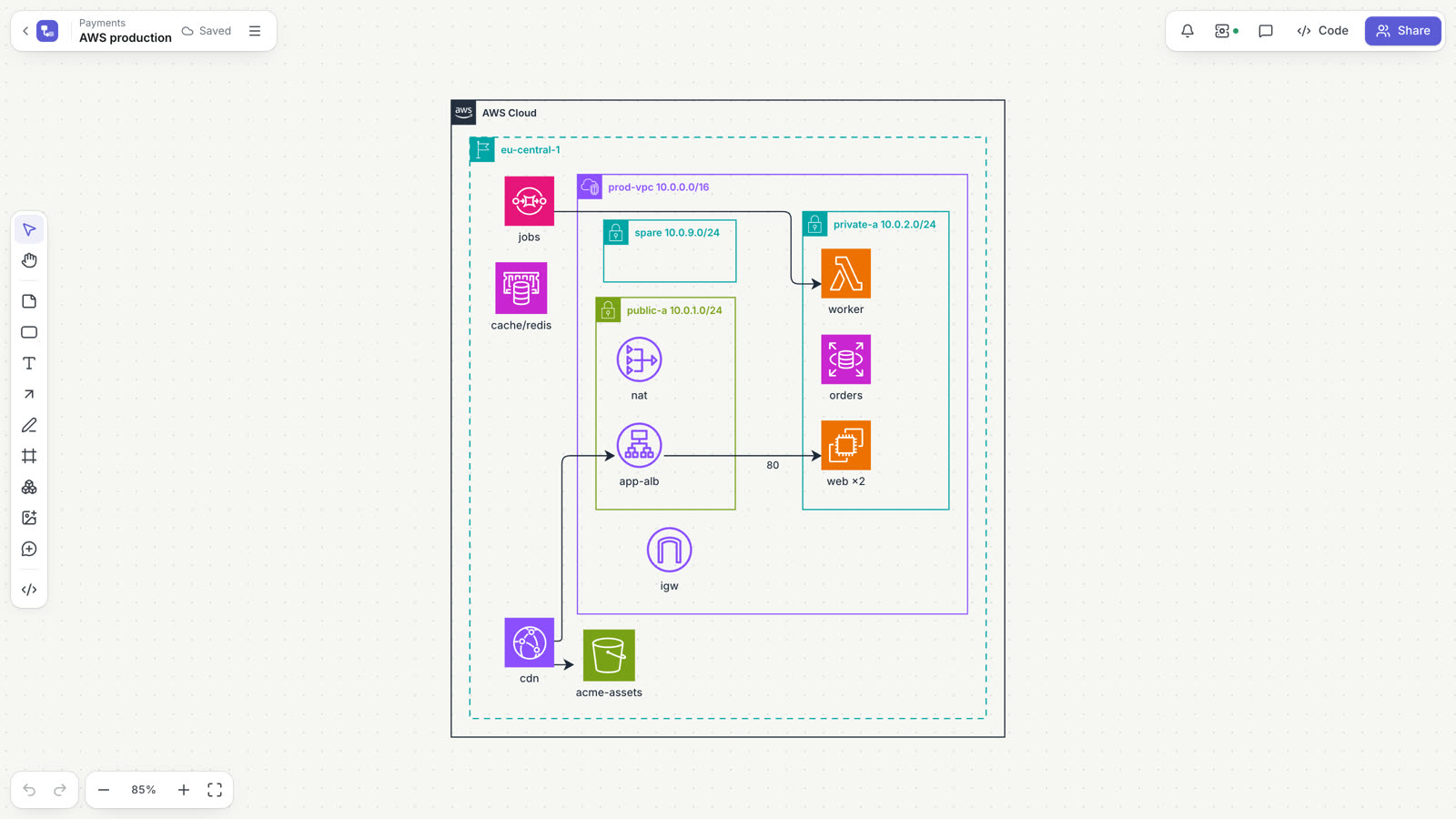
Doska can draw your infrastructure from the files that describe it: Terraform state, Kubernetes manifests and docker-compose. It then tells you when the board no longer matches those files and points out risky network settings. This page is for engineers who want an architecture diagram that is built from code instead of drawn and forgotten.
Supported sources
| Source | What to give Doska |
|---|---|
| Terraform | Output of terraform show -json (state or a saved plan) or a raw terraform.tfstate |
| Kubernetes | YAML manifests: several files, several documents separated by ---, helm template output, kind: List |
| Docker Compose | docker-compose.yml or compose.yaml |
The file type is detected automatically. Each file can be up to 25 MB. Doska never connects to your cluster or cloud account and does not store kubeconfigs or keys: you or your CI produce the files.
Prepare the files
# Terraform: current state
terraform show -json > state.json

# Terraform: a plan, before applying it
terraform plan -out plan.out
terraform show -json plan.out > plan.json

# Kubernetes: render a Helm chart into plain manifests
helm template ./chart > manifests.yaml
For Docker Compose, use your docker-compose.yml as is. If your infrastructure is split into stacks (network, cluster, databases), export each one: every file becomes its own diagram on the same board.
Build a diagram
- Open a board and choose Diagram from infrastructure… in the board menu.
- Drop the files, choose them, or paste the text.
- Pick the Level of detail: Overview or Detailed.
- Under What to do, choose Build a diagram (or Update the diagram if this source was imported before) and confirm.
The diagram is generated as D2 code. You can open it in the code panel, edit it and move shapes like any other diagram from code.
Overview and detailed
| Level | What you see |
|---|---|
| Overview | Main resources only. Routes become arrows (subnet → NAT gateway, internet gateway, router); listeners and target groups become direct arrows (load balancer → instance). |
| Detailed | Also security groups, route tables, prefix lists, roles and similar resources, gathered in a "Supporting resources" frame inside their VPC or region. |
Glue resources such as routes, associations, attachments, rules and listeners are never drawn as boxes; they become arrows.
What you get
- Terraform: frames for AWS Cloud, region, VPC, availability zones (when subnets span two or more) and public and private subnets. Resources land in their subnet by
subnet_id,vpc_configand similar references, databases and caches through their subnet groups. AWS icons cover EC2, Lambda, RDS and Aurora, DynamoDB, S3, SQS and SNS, load balancers, API Gateway, CloudFront, ECS and EKS, ElastiCache and more.countinstances in one subnet collapse into one node such as "web ×2". Traffic through load balancers, queues and topics is shown as direct arrows. - Kubernetes: a frame per namespace; Deployments, StatefulSets, DaemonSets, Jobs and CronJobs with replica counts ("×3"); arrows for Service → workload, Ingress and HTTPRoute → Service with host and path, workload → ConfigMap, Secret or PVC, and HPA → target. ConfigMaps, Secrets, RBAC, NetworkPolicies and PDBs are hidden in the overview.
- Docker Compose: services as nodes with image and ports, arrows from
depends_onandlinks, a frame for a service's network, named volumes in the detailed view.
What is stored
Only names, types and relations reach the board. Attribute values such as passwords, environment variables or the contents of a Secret are never saved anywhere. When you import in the browser, files are read on your computer; through the API they are parsed in server memory.
For the network check Doska also keeps CIDR ranges, ports and protocols from Terraform: they describe the network, not secrets.
Re-import keeps your layout
Every generated node has a stable key, such as aws_instance_web or deployment_api. Importing the same source again updates the same diagram in place: shapes you moved stay where you put them, and colors you changed are kept. The import window suggests the diagram that shares the most resources with your file, or offers to create a new one.
Drift check
Each element of a generated diagram is bound to its resource, for example tf:aws_instance.web. The infrastructure icon in the top bar shows how many differences there are and opens the Infrastructure panel:
- Not on the board: real resources missing from the diagram.
- No longer exist: elements bound to resources that are gone. They are outlined in red on the canvas.
- Connections missing on the board and Connections that do not exist.
- Rebuild diagram updates a generated diagram from the last import.
You can check a hand-drawn diagram too. Import the files with Only check the board: the board is not changed, the files become the reference. Then use Suggest bindings to match shapes to resources by name and icon, or bind a single shape with ⋯ → Bind to resource….
Check from CI
Run a check after every apply or deploy with an access token with edit access. With notify: true, a comment appears on the board when it is out of date; the same comment is not repeated.
helm template ./chart > manifests.yaml
curl -fsS -X POST "https://getdoska.top/api/v1/boards/$BOARD_ID/infra/check" \
  -H "Authorization: Bearer $DOSKA_TOKEN" -H "Content-Type: application/json" \
  --data "$(jq -Rs '{content: ., notify: true}' manifests.yaml)" | jq -e '.drift.inSync'
To rebuild the diagram after every terraform apply, send the file to /infra/import instead. Both endpoints are described in the API reference.
Network check
After a Terraform import, the Infrastructure panel has a Network section. It shows how many VPCs, subnets and security groups were found and flags problems:
- VPCs with overlapping address ranges (they cannot be peered);
- a subnet outside the range of its VPC;
- overlapping subnets;
- a security group that opens SSH (22), RDP (3389) or a database port (PostgreSQL, MySQL, SQL Server, Redis, MongoDB, Elasticsearch, etcd) to
0.0.0.0/0, or every port to the whole internet.
Can it reach?
Choose From (the internet or a resource), To, the protocol and the port. Doska checks step by step:
- Routing: the same VPC, or for traffic from the internet a public subnet and a public address.
- The outbound rules of the source's security groups.
- The inbound rules of the target's security groups.
The answer is Reachable, Blocked or Can't tell from this import, with the step where traffic passes or stops. Select two resources on the board and they are filled in for you. Network ACLs, VPC peering and transit gateways are not evaluated yet.
Limits
- Connections come from references between resources. Traffic that is not described in code (for example, a service that finds a database by a DNS name from a variable) is not visible.
- A Terraform plan without state knows only references from the configuration, not resource IDs.
- For configurations with more than 1,500 resources, import by module or use the overview.
Claude can do all of this for you through MCP: import files from a folder, check drift and answer "can A reach B". See Claude and MCP.